
An MCP server is a program that lets an AI application discover and use external data or capabilities through the Model Context Protocol (MCP). It sits between an AI host—Claude, ChatGPT, Cursor, or VS Code—and a data source, API, database, or software system, and exposes that system in a format a model can inspect and call without a bespoke integration for every host. If you have ever wanted an assistant to query live market data, search a dataset, or run a calculation against a real source instead of guessing from a static page, an MCP server is the interface that makes that possible.
The decision this article helps you make is narrower than "should I use AI." It is: when is a protocol-driven tool interface the right way to expose data to a model, and when should you keep using a REST API, a WebSocket stream, or bulk files directly? We build and run an MCP server for market data, so the mechanics below are drawn from how the protocol actually behaves and how we expose it.
Table of contents
MCP is best understood as a common interface for AI tools and data—not a replacement for an API, a database, or a language model. It standardizes how a model finds and calls capabilities. It says nothing about whether the data behind those capabilities is accurate, timely, or suitable for your strategy; that remains your responsibility and the provider's.
How an MCP server works
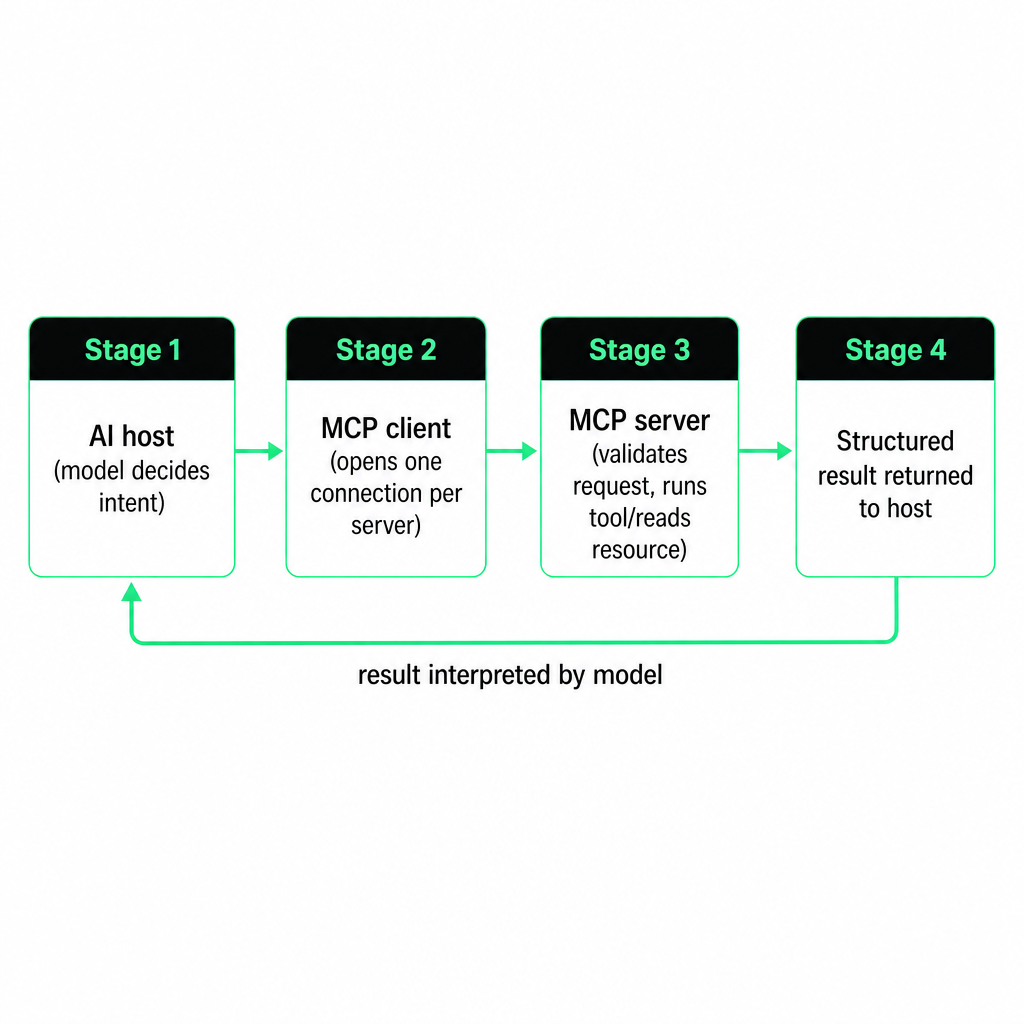
MCP uses a client-server architecture with three roles. The host is the AI application coordinating the interaction, such as Claude Desktop or VS Code. The client is the component inside the host that maintains a connection to one server. The server is the program that exposes data and functions for that client to use. The official architecture describes the host creating a separate client connection for each server it talks to, which keeps capabilities and permissions isolated per source.
A server can run locally on the same machine as the AI application or remotely over the internet. The server usually does not generate the AI response. It describes the capabilities it offers, receives structured requests, performs the requested operation, and returns structured results. The host then folds those results into its conversation or workflow.
That division matters for reasoning about trust and failure. The model decides what to ask for; the server decides whether and how to answer. If a request is malformed, the server rejects it. If the data is stale, the server returns stale data without claiming otherwise. The intelligence about intent lives in the host; the ground truth lives behind the server.
MCP server versus an API
An API exposes data or operations to software developers. An MCP server exposes them in a format designed for AI applications and tool discovery. The gap is who the primary consumer is and how they interact.
| Interface | Primary consumer | Typical interaction |
|---|---|---|
| REST API | Developer-written code | Calls a documented endpoint |
| WebSocket | Real-time application | Maintains a live connection |
| Bulk data files | Researcher or batch pipeline | Downloads and processes files |
| MCP server | AI assistant or agent | Discovers and invokes available tools |
An MCP server often calls an API internally. It is therefore usually an AI-ready delivery layer over an existing platform, not a separate source of truth. In our stack, the same data that powers our REST API is reachable through the MCP server, which is why both surfaces return consistent schemas.
For a quantitative workflow, the API, WebSocket, and bulk-file surfaces remain the right tools when an application needs deterministic control, high-throughput ingestion, or scheduled processing. MCP earns its place when an agent needs to search, inspect, combine, and explain data through natural-language instructions rather than hard-coded calls.
The three core server primitives
MCP servers expose three kinds of capability: tools, resources, and prompts. The official architecture identifies these as the main server primitives, and the distinction between them governs how a model is allowed to act.
Tools are executable functions a model can invoke—query a database, call an API, run a calculation, perform an external action. A tool normally carries a unique name, a human-readable description, an input schema, and a defined output format. The client discovers tools with tools/list and runs one with tools/call, and the input schema is what lets the model produce correctly structured arguments. Tools are generally model-controlled: the model decides when a tool is relevant, subject to the permissions and approval rules the host enforces. For a market-data server, tools might include search_markets, get_book, get_trades, and list_files.
Resources are data sources a model reads as context rather than operations it executes. A resource could be a document, a database record, an API response, a market-data file, or a schema catalog. Resources fit when the application already knows what information to load into context, instead of asking the model to execute an operation with arbitrary parameters.
Prompts are reusable templates that structure an interaction—for example, a template for analyzing a market or summarizing a dataset. A prompt shapes the conversation; a tool performs an operation. Confusing the two leads to brittle designs where a template is expected to fetch data it cannot reach.
Transport options: stdio and Streamable HTTP
MCP carries JSON-RPC messages and currently defines two principal transports: stdio and Streamable HTTP. The choice affects where the server runs, how it authenticates, and who can share it.
With stdio, the host launches the server as a local subprocess. The client sends messages through standard input; the server replies through standard output. This fits when the server is installed locally, the user wants a private integration, network access is unnecessary, and the host can launch local processes. A local filesystem connector is the classic example.
With Streamable HTTP, the server runs as an independent service. The client sends JSON-RPC over HTTP POST, with optional server-sent events for streaming or server-to-client messages. This fits when several users or applications need the same server, the data is hosted remotely, authentication is required, the provider manages infrastructure and updates, or the server must scale independently of any one host. Remote servers can use standard HTTP authentication—bearer tokens, API keys, or custom headers—and the MCP architecture documentation recommends OAuth for obtaining those tokens. For the precise wire behavior, the MCP transports specification is the primary reference.
A market-data example with our MCP server
Suppose a researcher asks an assistant: find the most recent resolved BTC 15-minute prediction market and show the order book five minutes after it opened. An MCP-enabled assistant can use a market-search tool to identify the market, retrieve its identifier, request the timestamped order book, filter to the requested time, and summarize the bid, ask, spread, and available depth. It is not guessing an identifier or scraping a static page; it is calling structured tools.
We provide a remote MCP server for our market-data platform, reachable over HTTPS at https://api.aymardata.com/mcp/. It uses the same API key as our REST surface, so no local binary is required, and it connects to supported clients—Claude Desktop, Claude Code, Cursor, ChatGPT, and VS Code—by supplying the endpoint and a bearer-token header.
| Tool | Purpose |
|---|---|
search_markets |
Search Polymarket markets by keyword, slug, condition ID, or token ID |
get_book |
Retrieve a timestamped level-two order book |
get_trades |
Retrieve trades for a market between two ISO-8601 timestamps |
list_files |
List daily Parquet files with presigned download URLs for eligible plans |
Our documented examples cover Polymarket discovery, historical books and trades, Kalshi trade summaries, Binance and Hyperliquid mid-price comparisons, and locating Parquet files for analysis. That makes the server well suited to exploratory research and agent-assisted analysis across prediction markets and crypto venues. The current connection configuration lives in our MCP server documentation, and teams building tool-using assistants can see how we frame this in our AI agents solution.
When MCP fits, and when a direct interface wins
An MCP server is a strong fit when the task involves interpretation, discovery, or several connected data operations. Reach for it when you want to ask questions about external data in natural language, let an agent discover available datasets or instruments, combine multiple calls into one research workflow, give an assistant controlled access to market data, or prototype an analysis before turning it into a deterministic program. A researcher might ask an agent to find a market, pull its trades, compare the mid-price against another venue, and flag unusual basis movement—all in a single exchange.
MCP is not automatically the best interface for every workload. Choose a REST API when your application already knows the endpoint and parameters, needs deterministic behavior, runs on a schedule, or requires direct control over retries and error handling. Choose a WebSocket stream when you need live book or trade updates, latency matters, your application holds state continuously, or you are building real-time monitoring or execution. Choose bulk files when you are downloading large historical ranges, need reproducible backtests, want to process locally with Python, DuckDB, or Spark, or when repeated API calls would be wasteful.
A practical architecture uses more than one surface at once: MCP for agent interaction, REST for targeted queries, live streams for real-time data, and bulk Parquet or CSV files for historical research. The surfaces are not competitors; they match different stages of a workflow.
Security and data-quality risks
An MCP server gives an AI application access to tools and data, and that access is a permission boundary. Treat it as one.
Tool invocation carries the sharpest risk. A tool may only read, or it may create side effects. A read-only market-data query has a very different profile from a tool that can place orders, write files, or modify an account. The official MCP documentation recommends keeping a human in the loop with the ability to deny tool invocations, especially where a tool can cause external effects. Credentials deserve the same discipline: API keys and bearer tokens do not belong in prompts or in untrusted applications. Store them in the client's secret configuration and grant only the permissions the task requires.
Retrieved content can be incomplete, malformed, stale, or misleading, and a model can misinterpret a perfectly valid result. For trading research, verify the market and instrument identifiers, the timestamp and timezone, the venue and product type, the book depth and update semantics, and whether events are missing or duplicated—and confirm whether the result is historical, delayed, or live. A model can also overreach by selecting the wrong tool or inferring parameters incorrectly; clear tool descriptions, strict input schemas, bounded date ranges, and user confirmation all reduce that.
Easier retrieval does not make a backtest valid. A strategy still needs honest assumptions about latency, queue position, fees, partial fills, market resolution, and data completeness. Our guide to backtesting with order-book data covers book reconstruction and fill modeling for researchers who need that depth before trusting any result an agent hands back.
Frequently asked questions
Is an MCP server an AI model?
No. An MCP server usually does not generate the answer. It provides data or executable capabilities to an AI application, which uses a language model to decide how to apply the result.
Is an MCP server the same as an API?
No. An MCP server may call an API internally, but MCP adds AI-oriented discovery, tool schemas, and a standardized client-server interaction on top of it.
Is MCP only for local software?
No. Servers can run locally over stdio or remotely over Streamable HTTP. A remote server is easier to share and maintain; a local server can avoid network access for private workflows.
Can an MCP server access live market data?
Yes, if the server exposes live or recent data through its tools. The actual freshness, latency, coverage, and update frequency depend on the provider and the underlying data source.
Does our MCP server replace the REST API?
No. Our MCP server is an agent-ready interface to selected market-data capabilities. The REST API, live streams, and bulk files remain better suited to deterministic applications, real-time systems, and large historical workloads.